Air-gapped migration with a local model: Ollama on a cloud VM
June 12, 2026
Many of the organisations that most need to migrate from Azure DevOps to GitHub Actions are
exactly the ones that cannot send pipeline source to a public LLM API: banks, defence, health,
anyone under data-residency or export rules. Bifrost is built for them. Its LLM layer is a single
LlmProvider trait, and air-gap mode routes every request to a local provider only — with a
test target that asserts zero external calls. The local provider of choice is Ollama, running
a small model on a machine inside your own network.
This post is the practical version: what to stand up, CPU versus GPU, how it connects, and a real scenario for how it should be used.
What “air-gapped” actually means here
Air-gap does not have to mean “no LLM.” In most regulated environments it means in-network
providers only: you can reach a model running on a VM in your own VPC, or a private,
in-tenancy frontier endpoint — but not the public internet. Bifrost models this directly. A
provider declares whether it is_local; in air-gap mode the router silently skips every non-local
provider, so a frontier never receives pipeline data and no external call is ever made. The
assistant, the bulk gap-fills, everything — all local.
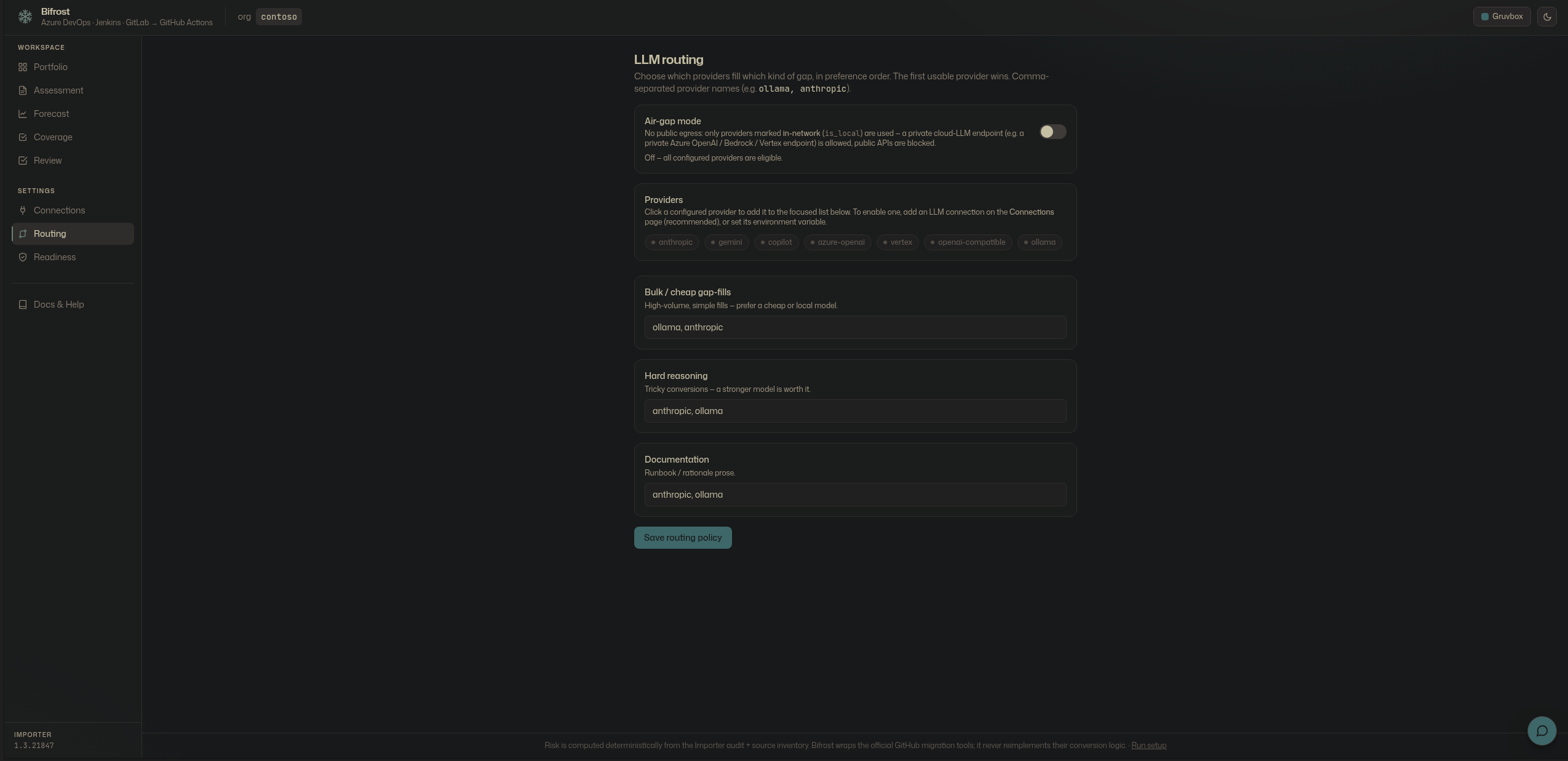
The setup: Ollama on an in-network VM
Stand up one VM inside your network (a cloud VPC subnet with no egress, or on-prem), install Ollama, and pull a small instruct or coding model. Bifrost talks to it over Ollama’s HTTP API.
# On the in-network VM
curl -fsSL https://ollama.com/install.sh | sh
ollama pull <a-small-instruct-model>     # a few GB, quantised
ollama serve                              # exposes http://<vm>:11434
Point Bifrost at it — either as the first-class Ollama provider or as a generic OpenAI-compatible endpoint (Ollama serves both):
export OLLAMA_BASE_URL="http://<vm>:11434"
export BIFROST_AIR_GAP=1                   # force local-only routing
Or add it on the Connections page as an LLM provider (Ollama, or “OpenAI-compatible” pointed
at http://<vm>:11434/v1), marked local so the router treats it as air-gap-eligible. Secrets are
stored as references, never values.
CPU or GPU — both are useful
Bifrost’s grounded gap-fill is a small, bounded task: it hands the model the source snippet, the Importer’s converted output, and the specific failure, and asks it to fill that gap. That is the key to making a small model viable.
- CPU. A small quantised model (think a few billion parameters at 4-bit) runs on an ordinary multi-core VM. Throughput is modest — seconds per gap — but for a portfolio you convert in the background and review, so latency rarely matters. This is the cheapest air-gap option and needs no special hardware.
- GPU. Add a single mid-range GPU and the same model runs many times faster, and you can step up to a larger local model for the harder, classic-pipeline gaps. Use a GPU when you have thousands of pipelines, tight migration windows, or want a bigger model for reasoning-heavy conversions.
Either way the rule is the same: route bulk, mechanical fills to the small local model, and reserve the heavier model — local GPU, or an in-network private frontier — for the hard reasoning. That is exactly what the routing policy expresses.
Other local and in-network options
Ollama is the simplest, but the trait is the point — nothing in orchestration is tied to it:
- llama.cpp / vLLM behind the OpenAI-compatible provider, for higher throughput serving.
- A private, in-tenancy frontier endpoint — Azure OpenAI on a private endpoint, Vertex in your project, or a Bedrock-style gateway — added as a provider and marked local/in-network. In air-gap mode these are eligible precisely because they never leave your network.
- A mix: the small Ollama model for bulk, a private frontier for the few hard gaps. The router picks per task class; air-gap still excludes anything truly external.
A real-life scenario
A bank is moving 1,800 Azure DevOps pipelines to GitHub Enterprise Cloud under a rule that no pipeline definition may touch a public AI service.
- Stand up the model. Platform engineering provisions one GPU VM in the bank’s VPC, installs Ollama, pulls a small quantised instruct model, and confirms the subnet has no public egress.
- Connect and lock down. Bifrost is deployed in the same VPC. On Connections they add the
Ollama provider (local) and the Azure DevOps source. They set
BIFROST_AIR_GAP=1and lock it. The air-gap test asserts zero external calls; the audit log records the posture on every job. - Assess and forecast. They run the audit — the portfolio heatmap, the Assessment of source inventory, the Forecast of GitHub cost, and the Coverage matrix — all computed deterministically, no model involved.
- Convert locally. Bulk, mechanical gap-fills run against the small local model overnight. The handful of classic-pipeline gaps that need real reasoning are routed to a larger model on the same GPU. Not one byte leaves the network.
- Review and deliver. Engineers review each proposal in the three-pane diff, ask the grounded assistant — also local — about cost or coverage, approve or edit, and Bifrost opens pull requests. The change board gets the per-project PDF report.
The migration runs at portfolio scale, semantically assisted, fully reviewed — and provably inside the bank’s walls.
How it should be used
- Small model for bulk, bigger for hard. Don’t reach for a large model to fill a
PublishBuildArtifactsgap; a small local model does it. Save the GPU/larger model for the classic-pipeline tail. - Air-gap on, and locked. Turn it on and lock it for regulated work; let the zero-egress test be part of your evidence.
- Review-first, always. The local model fills gaps from the diff and explains them; a human still approves every change before a PR. The model never scores risk and never prices cost — those stay deterministic.
If you can run one small model on one machine inside your network, you can run a reviewed, documented, portfolio-scale migration without any pipeline data ever leaving it.